Comprehensive Trade Analysis: Methodology, Code, and Insights

Trade
Author

Pawan

Published

December 19, 2025

Modified

December 19, 2025

Introduction to Trade Analysis Methodology

Here the Trade analysis involves systematically examining India trade data to identify patterns, trends, and economic relationships with their trade partners. Proper trade analysis requires data cleaning, appropriate statistical methods, and effective visualization. Here we provided the R code to analyze India’s trade data but it’s may contains several errors and methodological issues that need correction for meaningful analysis.

Code Corrections and Improvements

Data Loading

The original code loads trade data from RDS files and an Excel file containing HS code classifications.

Code
# Corrected and improved data loading and library
library(data.table)
library(ggplot2)
library(gridExtra)
library(readxl)
library(viridis)
library(hrbrthemes)
library(dplyr)

## Load data with error handling
usd_exports <- as.data.table(readRDS("/home/pawan/trade/totaltrade/total_exportsusd.rds"))
qty_exports <- as.data.table(readRDS("/home/pawan/trade/totaltrade/total_exportsqty.rds"))
usd_imports <- as.data.table(readRDS("/home/pawan/trade/totaltrade/total_importsusd.rds"))
qty_imports <- as.data.table(readRDS("/home/pawan/trade/totaltrade/total_importsqty.rds"))

## Load HS code classification
hs_classification <- as.data.table(read_excel("/home/pawan/trade/totaltrade/two-digit.xlsx"))

Visualization Theme

Code
## Improved visualization theme
my_theme <- theme_minimal(base_size = 14) +
  theme(
    text = element_text(family = "Arial", color = "#2c3e50"),
    plot.title = element_text(size = 18, face = "bold", hjust = 0.5, 
                             margin = margin(15, 0, 15, 0)),
    plot.subtitle = element_text(size = 12, hjust = 0.5, color = "#7f8c8d"),
    axis.title = element_text(size = 14, face = "bold"),
    axis.title.y = element_text(margin = margin(0, 15, 0, 0)),
    axis.title.x = element_text(margin = margin(15, 0, 0, 0)),
    axis.text = element_text(size = 11),
    axis.text.x = element_text(angle = 45, vjust = 0.5, hjust = 1),
    legend.position = "bottom",
    legend.title = element_blank(),
    legend.text = element_text(size = 11),
    panel.grid.major = element_line(color = "#ecf0f1", linewidth = 0.5),
    panel.grid.minor = element_blank(),
    panel.border = element_rect(color = "#bdc3c7", fill = NA, linewidth = 0.5),
    plot.background = element_rect(fill = "white", color = NA),
    plot.margin = unit(c(1, 1, 1, 1), "cm"),
    strip.background = element_rect(fill = "#f8f9fa", color = "#dee2e6"),
    strip.text = element_text(face = "bold", size = 12)
  )
Data Cleaning and Standardization

The original data cleaning had several issues, including incorrect variable names and improper type conversions:

Code
## Standardized data cleaning function
clean_trade_data <- function(dt, value_col, is_import = FALSE) {
  ## Create HS codes
  dt[, `:=`(
    HSCode2 = substr(HSCode, 1, 2),
    HSCode4 = substr(HSCode, 1, 4),
    HSCode6 = substr(HSCode, 1, 6)
  )]
  
  ## Clean numeric values (remove commas, dots, convert to numeric)
  dt[, (value_col) := as.numeric(gsub("[.,]", "", get(value_col)))]
  dt[is.na(get(value_col)), (value_col) := 0]
  
  return(dt)
}

## Apply cleaning to all datasets
usd_exports <- clean_trade_data(usd_exports, "Export")
qty_exports <- clean_trade_data(qty_exports, "Export")
usd_imports <- clean_trade_data(usd_imports, "Import")
qty_imports <- clean_trade_data(qty_imports, "Import")

Comprehensive Trade Balance Analysis

The original trade balance calculation was overly simplistic. Improved version:

Code
## Calculate comprehensive trade statistics
calculate_trade_metrics <- function(usd_exports, usd_imports, qty_exports, qty_imports) {
  
  ## Aggregate by year
  export_usd_agg <- usd_exports[, .(Export_USD = sum(Export, na.rm = TRUE)), by = Year]
  import_usd_agg <- usd_imports[, .(Import_USD = sum(Import, na.rm = TRUE)), by = Year]
  export_qty_agg <- qty_exports[, .(Export_Qty = sum(Export, na.rm = TRUE)), by = Year]
  import_qty_agg <- qty_imports[, .(Import_Qty = sum(Import, na.rm = TRUE)), by = Year]
  
  ## Merge all metrics
  trade_balance <- export_usd_agg[import_usd_agg, on = "Year"]
  trade_balance[export_qty_agg, on = "Year", Export_Qty := i.Export_Qty]
  trade_balance[import_qty_agg, on = "Year", Import_Qty := i.Import_Qty]
  
  ## Calculate derived metrics
  trade_balance[, `:=`(
    Trade_Balance_USD = Export_USD - Import_USD,
    Trade_Balance_Qty = Export_Qty - Import_Qty,
    Trade_Volume_USD = Export_USD + Import_USD,
    Trade_Volume_Qty = Export_Qty + Import_Qty,
    Export_Coverage_Ratio = Export_USD / Import_USD * 100,
    Yearly_Growth_Export = (Export_USD / shift(Export_USD) - 1) * 100,
    Yearly_Growth_Import = (Import_USD / shift(Import_USD) - 1) * 100
  )]
  
  return(trade_balance)
}

trade_metrics <- calculate_trade_metrics(usd_exports, usd_imports, qty_exports, qty_imports)

Sectoral Analysis with Proper Categorization

The original sectoral analysis had incorrect HS code mappings and missing categories:

Code
## Enhanced sectoral analysis function
analyze_sector <- function(qty_data, hs_code, sector_name, is_import = FALSE) {
  value_col <- ifelse(is_import, "Import", "Export")
  
  sector_data <- qty_data[HSCode2 == hs_code]
  
  ## Create proper commodity classification
  sector_data[, Commodity := case_when(
    HSCode4 == "1006" ~ "Rice",
    HSCode4 == "1001" ~ "Wheat",
    HSCode4 == "1005" ~ "Maize",
    HSCode4 == "1008" ~ "Buckwheat & Millet",
    HSCode4 == "1007" ~ "Grain Sorghum",
    TRUE ~ "Other Cereals"
  )]
  
  ## Aggregate by year and commodity
  agg_data <- sector_data[, .(Quantity = sum(get(value_col), na.rm = TRUE)), 
                          by = .(Year, Commodity)]
  
  ## Calculate shares
  agg_data[, Share := Quantity / sum(Quantity) * 100, by = Year]
  
  return(list(data = agg_data, sector = sector_name))
}

## Analyze key sectors
cereals_export <- analyze_sector(qty_exports, "10", "Cereals Exports")
fertilizer_import <- analyze_sector(qty_imports, "31", "Fertilizer Imports", TRUE)
petroleum_import <- analyze_sector(qty_imports, "27", "Petroleum Imports", TRUE)

Advanced Visualization Functions

Code
## Function for trade balance visualization
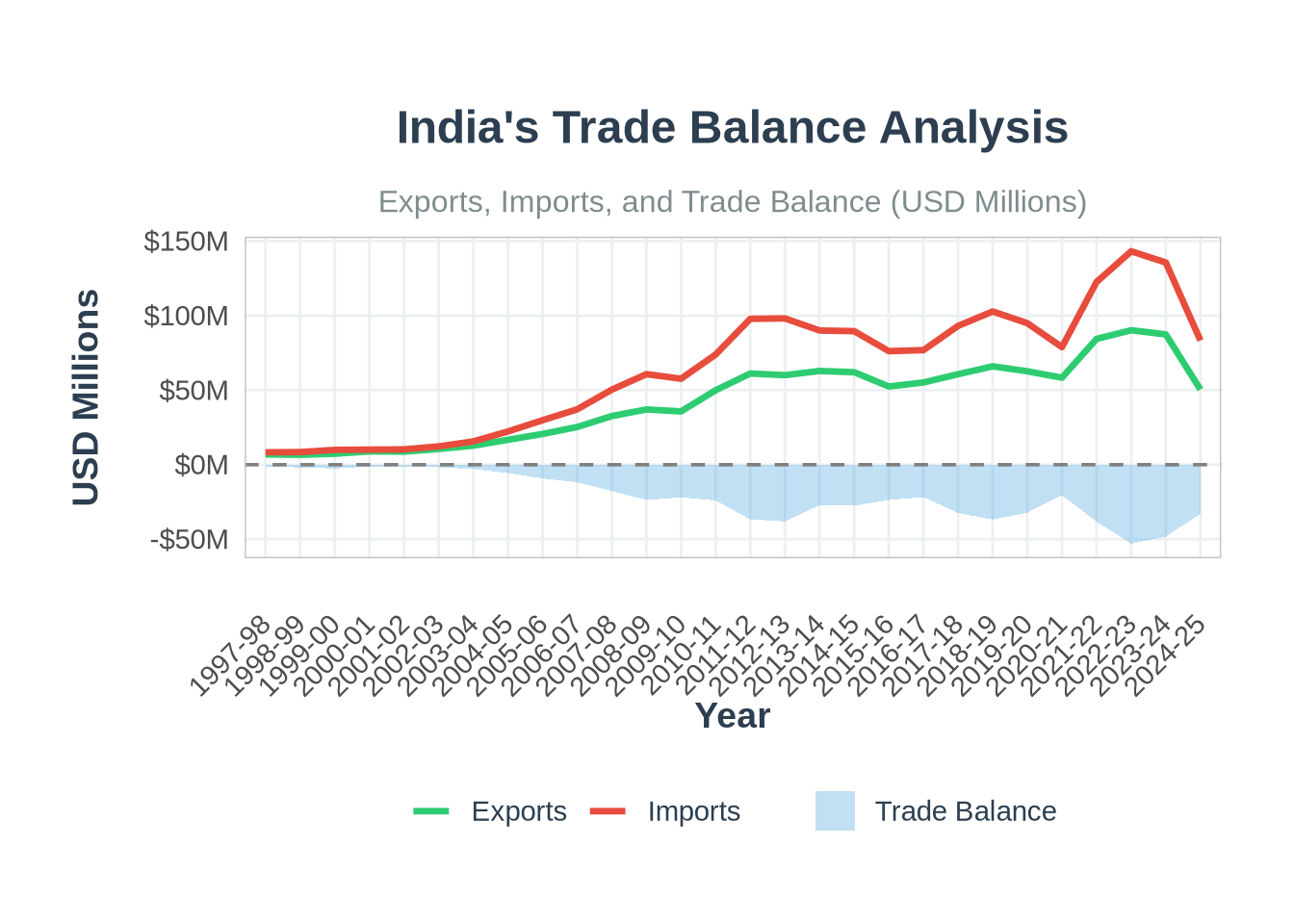
plot_trade_balance <- function(trade_data) {
  p <- ggplot(trade_data, aes(x = Year, group = 1)) +
    geom_line(aes(y = Export_USD, color = "Exports"), linewidth = 1.2) +
    geom_line(aes(y = Import_USD, color = "Imports"), linewidth = 1.2) +
    geom_area(aes(y = Trade_Balance_USD, fill = "Trade Balance"), alpha = 0.3) +
    geom_hline(yintercept = 0, linetype = "dashed", color = "gray50") +
    scale_color_manual(values = c("Exports" = "#2ecc71", "Imports" = "#e74c3c")) +
    scale_fill_manual(values = c("Trade Balance" = "#3498db")) +
    my_theme +
    labs(
      title = "India's Trade Balance Analysis",
      subtitle = "Exports, Imports, and Trade Balance (USD Millions)",
      y = "USD Millions",
      x = "Year",
      color = "Trade Flow",
      fill = "Balance"
    ) +
    scale_y_continuous(labels = scales::dollar_format(scale = 1e-6, suffix = "M")) +
    theme(legend.position = "bottom", legend.box = "horizontal")
  
  return(p)
}

## Function for sectoral analysis visualization
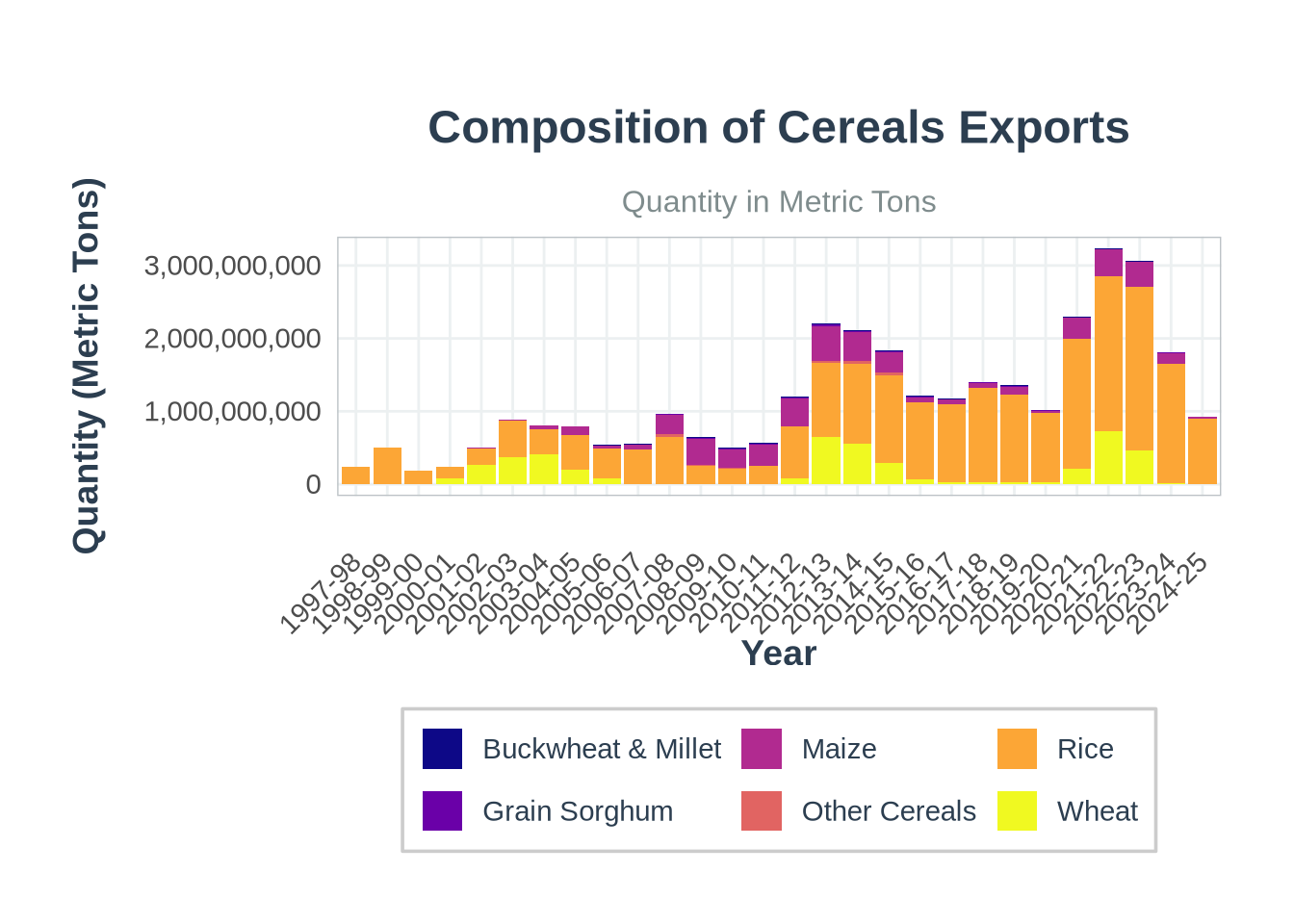
plot_sector_composition <- function(sector_data, title) {
  p <- ggplot(sector_data$data, aes(x = Year, y = Quantity, fill = Commodity)) +
    geom_bar(stat = "identity", position = "stack") +
    my_theme +
    scale_fill_viridis_d(option = "C") +
    labs(
      title = paste("Composition of", sector_data$sector),
      subtitle = "Quantity in Metric Tons",
      y = "Quantity (Metric Tons)",
      x = "Year",
      fill = "Commodity"
    ) +
    scale_y_continuous(labels = scales::comma_format()) +
    theme(
      legend.position = "bottom",
      legend.background = element_rect(fill = "white", color = "gray80")
    )
  
  return(p)
}

plot_trade_balance(trade_metrics)

Code
plot_sector_composition(cereals_export)